Plenty of remote teams create an informal "office" using tools they already have. They leave a Slack huddle open all day or set up a Discord voice channel called "office" where people hang out while they work. If everyone already uses the platform, there's no new account to create, and getting started costs little or nothing beyond the team's existing plan.
For a small team, this can work well. But as more people join and conversations start to overlap, an open call can become harder to share. This article looks at where that setup falls short and compares five virtual office tools you might use instead. We build Hiroba, one of those tools. The comparisons focus on availability, conversations, guest access, and laptop performance so you can decide what fits your team.
Why an always-on huddle works at first
A huddle is the closest thing Slack has to a shared room. Someone starts one in a team channel, people drop in, and joining takes just one click. On a paid plan, a huddle supports up to 50 people, with video for up to 25 participants. It also includes screen sharing and a thread for notes and links.
For a small team that already lives in Slack, keeping a huddle open is an easy way to try working alongside one another remotely. Questions get answered in seconds, nobody has to schedule a call for a quick question, and the day feels less lonely.
The limitations emerge when you ask that call to serve as an office: somewhere people can work quietly, see who's available, and have separate conversations.
Where it breaks down
1. One room, one conversation
A huddle is a single audio space. When two people start debugging something, everyone else hears the conversation. The others have to tune it out, turn down the audio, or leave. One workaround is to start a second huddle in another channel, but that makes it harder to keep track of where everyone is. In a physical office, separate conversations can happen a few desks apart without the whole team having to listen.
2. You can't see who is free before you interrupt
Slack shows a green dot and a status emoji, but those signals don't always tell you whether a colleague is deep in a task or free to talk. Inside a huddle, you can see who's there and who's speaking. If the person you need isn't in it, though, you're often back to sending "are you around?" and waiting for a reply. In a physical office, a glance can help you decide whether to ask now or wait ten minutes. A huddle gives you fewer of those cues.
3. Joining is a decision, so people stop joining
Joining a huddle means choosing to be in a call with whoever is there. Leaving can feel like hanging up on them. Over time, that friction can put people off. The huddle may shrink to the two or three people who are comfortable staying in a call all day, while everyone else drifts back to text. Slack's free plan adds a simpler constraint: huddles are limited to two participants.
4. An all-day call can strain laptops
Slack's desktop client is an Electron app. A huddle keeps a WebRTC session and audio processing running, along with video processing if cameras are on. That may be unnoticeable on a modern desktop. On an older laptop already running an IDE and a browser, it can mean louder fans, shorter battery life, and a sluggish editor. The person with the oldest machine may be the first to close the huddle "just for now". If your office depends on everyone staying in a call, those small annoyances matter.
5. It ends when the last person leaves
A huddle ends when the last participant leaves. The next morning, someone has to start another one, and on days when nobody does, there is no shared space to drop into. The thread remains, but the call doesn't.
The Discord version of the same problem
Discord solves the persistence problem: a voice channel called "office" is always there, even when it's empty. You can also create separate channels—Focus, Pairing, Lounge—so different conversations have their own spaces. Teams already familiar with Discord may find this a better fit than Slack, and creating a server is free.
Some limitations remain. Seeing someone in a voice channel doesn't necessarily mean they're available to talk, and moving between channels still means leaving one conversation to join another. Discord's desktop client is also an Electron app, and staying connected to voice all day keeps a live session running. Video in a voice channel is capped at 25 participants.
There are also practical considerations for work. Discord accounts belong to individuals: removing someone from your server revokes their access to it, but doesn't deactivate their account. Work channels sit alongside any personal servers they use. Clients or contractors need a Discord account and a server invite, and you'll need to configure permissions to control what they can see. For a small team of friends, that may be fine. For a customer joining a twenty-minute conversation, it adds friction.
What a virtual office does differently
A virtual office gives your team a shared space that exists even when no one is talking. Depending on the product, it can add some or all of the following:
- Availability at a glance. See who's at their desk, in a meeting room, away, or set to do not disturb before you start a conversation.
- Several conversations at once. Separate rooms or proximity-based audio let small groups talk independently within the same office.
- Easy ways to start a conversation. Move your avatar next to a colleague or use a Call button to get their attention, without asking everyone to wait in an open call.
- Guest access without accounts. Invite a client or candidate through a browser link, with no account to create or app to install.
- An app you can leave open. The office only works if everyone can keep it running throughout the day, including teammates with older laptops. Check CPU and memory use both when the office is quiet and during a conversation.
That last point is easy to overlook during a short trial. Hiroba's published idle figures are included below, but idle resource use alone doesn't tell you how an app performs during calls. Try your usual mix of voice, video, and screen sharing on the laptops your team actually uses.
Five tools compared
The table compares five virtual office tools, with Slack and Discord included for reference. Gather and Kumospace share a row. Prices are in USD per month, based on each vendor's official pricing page as of October 10, 2026. Per-member prices are shown unless otherwise noted; annual-billing rates appear in parentheses. The table scrolls horizontally on small screens.
| Tool | Price | Free plan or trial | Office layout and features | Guests | Runs as |
|---|---|---|---|---|---|
| Slack huddles | Included in Slack. Pro about $8.75 ($7.25 with annual billing) per user | Huddles limited to 2 participants | One call per channel, up to 50 people, 25 on video | Need to be in the Slack workspace or Slack Connect | Electron desktop app, browser, mobile |
| Discord | Free; Nitro is per person, not per team | Free voice channels; optional paid upgrades | Persistent voice channels, up to 99 per channel, 25 on video | Need a Discord account and a server invite | Electron desktop app, browser, mobile |
| Tandem | $64 for 10 members, $129 for 50 (20% off with annual billing) | Up to 4 members, 5 call hours a day | Team roster with rooms and status, one-click calls, no map | Invite links | Desktop app, Chrome extension |
| Gather / Kumospace | Gather $15 ($12 annual); Kumospace $16, 5-seat minimum | Gather: none, 30-day trial. Kumospace: up to 5 members | 2D map with proximity video, meeting rooms, recording | Browser link | Browser, desktop app, mobile app |
| SoWork | Basic $6 ($5.40 annual), Premium $15 ($12 annual) | Up to 10 members, 30-minute meeting cap | Customizable 2.5D office with meetings and recording | Browser link | Browser, mobile app |
| Hiroba | $2 per seat | Automatic 30-day trial, no credit card required | Office floor with lobby and team rooms, spatial audio, Call button, screen sharing, video | Browser link, name only, no account | Native desktop app (Mac/Windows), idle CPU near 0%, about 100 MB; guests in a browser |
Slack's per-user price covers the workspace, so huddles cost nothing extra if you're already on a paid plan. Discord's limits apply per voice channel, and a server can have many channels. For more detail on Gather and Kumospace, see our Gather alternatives and Kumospace alternatives comparisons.
Which tool fits your team?
We mainly want to see who's around
Consider Hiroba or Tandem. Both put team availability at the center of the experience. Hiroba shows teammates on an office floor and lets you talk by moving your avatar near theirs. Tandem uses a team roster with status indicators and one-click calls. For 10 people, Hiroba costs $20 a month and Tandem costs $64.
We want meeting rooms and recording for stand-ups
Consider SoWork Premium, Gather, or Kumospace. All three combine a virtual office with meeting and recording features, at $12 to $16 per member per month depending on the product and billing cycle. SoWork Basic costs $6 per member per month and covers the office and calls, but does not include unlimited recording.
People close Slack calls because their laptops get hot
Try Hiroba. Its native desktop app uses near 0% CPU and about 100 MB of memory when idle. It is designed to stay open alongside your other work apps. Test it during calls as well to see how it handles your team's workload.
We're on Discord and the only real problem is bringing in clients
Look at tools with browser-based guest access. In Hiroba, guests enter a name and join without creating an account. Gather, Kumospace, and SoWork also support joining through a browser. Check guest limits and try the invitation flow during your trial.
We're two people
Keeping the huddle or Discord channel may be enough. The problems described here tend to matter more as the team grows and people need to have separate conversations.
Why we'd suggest trying Hiroba first
We built Hiroba around two priorities: making it easy to see who's available and keeping the app light enough to leave open all day. It's a native desktop app for macOS and Windows, built with Tauri.
Your organization gets an office floor with a lobby and team rooms. Avatars show who's around, while the roster on the left shows who's active, away, or busy. Move your avatar near a colleague to start talking through spatial audio, or use the Call button to get someone's attention in another room. During a conversation, you can share your screen or turn on your camera. Each room also has a shared bulletin board for notes you want to keep after the conversation ends. Audio and video use peer-to-peer WebRTC connections and never pass through the server.
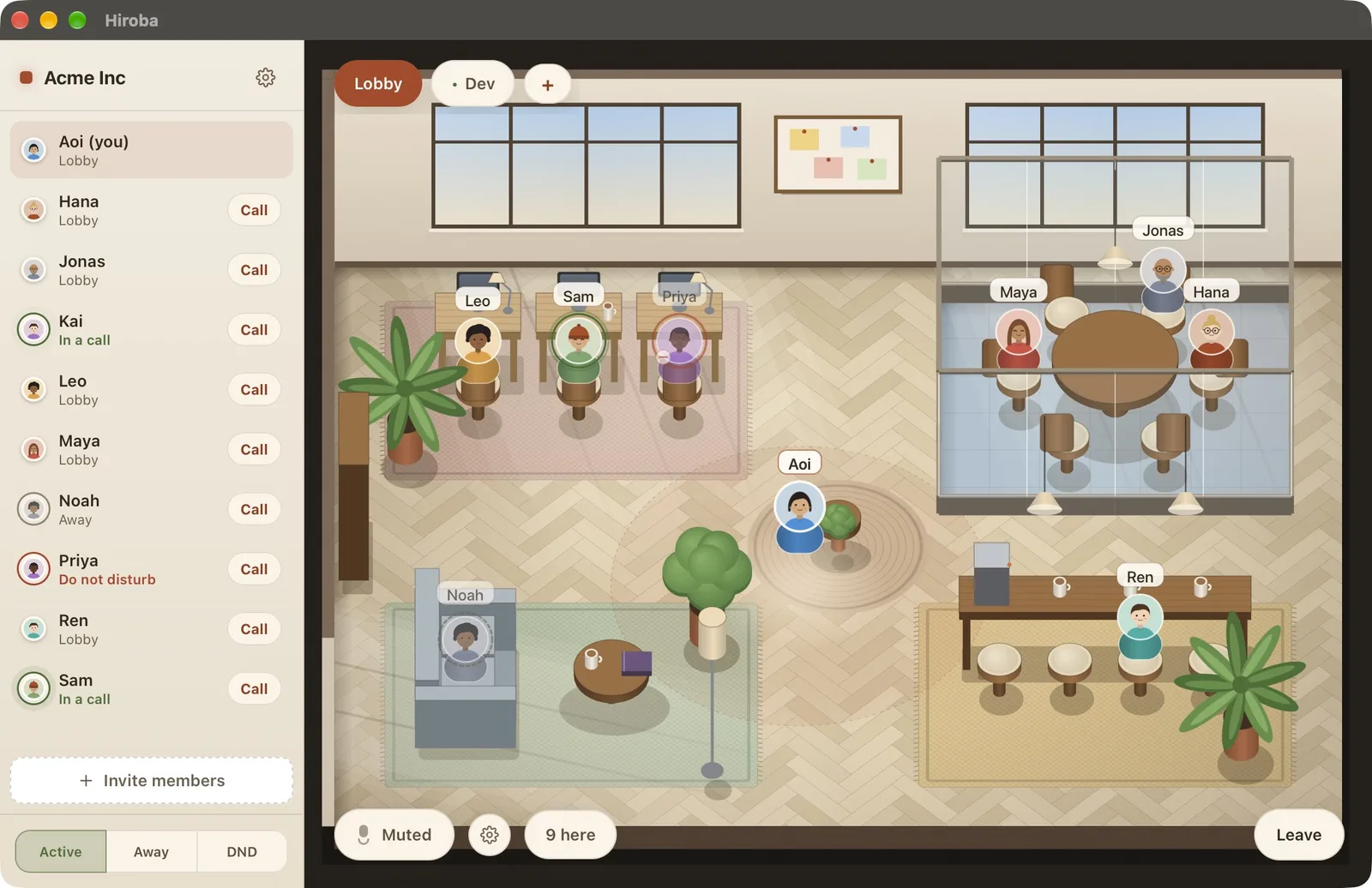
Keep Slack or Discord for chat, and use Hiroba for the informal conversations that used to happen in your open call. Guests can join through a browser link with just a name. You can try that flow yourself: the card below opens our public demo office.
The hosted edition costs $2 per seat per month. A 30-day trial starts when you sign in, with no credit card required. If you'd rather host it yourself, the source code is available on GitHub under the Apache-2.0 license. For scheduled meetings that need recording, keep using Zoom or Google Meet.
Try Hiroba in place of your open huddle for a full working day. See whether it makes quick conversations easier—and whether your team is still using it at 5 pm.
Download Hiroba→Frequently asked questions
Can you use Slack huddles as a virtual office?
Yes, especially for a small team. Keep in mind that everyone shares one audio space, the huddle gives you limited information about colleagues outside it, and staying connected all day can strain laptops. Slack's free plan limits huddles to two participants. If those constraints become a problem, a dedicated virtual office can provide a shared space while you keep Slack for chat.
How many people can join a Slack huddle?
Up to 50 on paid plans, with video for up to 25 participants at once. On the free plan a huddle is limited to two people.
Is Discord a good virtual office for a company?
It can work well for a small team already familiar with Discord. Voice channels remain available when empty, and you can create several for separate conversations. However, being in a channel doesn't necessarily mean someone is free to talk. Accounts belong to individuals, and guests need a Discord account and a server invite. Video in a voice channel is limited to 25 participants.
What are the lowest-cost alternatives to an always-on huddle?
Among the paid hosted plans listed here, Hiroba has the lowest per-seat price at $2 per month with no seat minimum, followed by SoWork Basic at $6 per member on monthly billing. For small teams, Tandem, Kumospace, and SoWork offer free plans with different limits; see the table above. Hiroba can also be self-hosted without a software license fee under Apache-2.0.
Do we have to leave Slack to use a virtual office?
No. You can keep Slack or Discord for text chat and use a virtual office to see who's available and have quick voice conversations. It replaces the call you leave open, not your team's chat history or channels.
Which option should we try if laptop performance is a concern?
Hiroba is worth trying: its native Tauri desktop app uses near 0% CPU and roughly 100 MB of memory when idle. Those figures describe an idle office, not an active video call. Compare performance on your team's own laptops during voice calls, video, and screen sharing as well.