Sococo's standard plan costs $13.49 per seat per month, prepaid annually, with a 10-seat minimum. It includes 500 minutes per seat each month for built-in audio, video, and screen sharing. The Unlimited plan costs $24.99 per seat per month and requires at least 100 seats.
If those minimums or call limits don't suit your team, this guide compares five alternatives: Gather, Kumospace, SoWork, Tandem, and Hiroba. Prices come from each vendor's official pricing page as of October 10, 2026. We build Hiroba; below, we explain where it fits and where another tool may be a better choice.
Comparison table
Prices are in USD per user per month unless noted otherwise, as listed on official pricing pages on October 10, 2026. Where both billing options are available, the monthly rate appears first, followed by the equivalent monthly rate when billed annually in parentheses. The table scrolls horizontally on small screens. Check each vendor's page for current pricing before subscribing.
| Product | Paid price | Minimum / term | Call minutes | Free plan | Monthly cost for 10 people | Platforms |
|---|---|---|---|---|---|---|
| Sococo | $13.49; Unlimited $24.99 | 10 seats, annual prepayment; Unlimited 100 seats | 500 per seat per month, pooled; $5 per extra 1,000 | None. 14-day trial with 500 minutes | $134.90 | Browser (Chrome), mobile apps |
| Gather | $15 ($12 annual) | None | Unmetered | None. 30-day trial, no card | $150 | Browser, desktop app, mobile app |
| Kumospace | $16 | 5 seats | Unmetered | Up to 5 members, 1 floor. 14-day Business trial | $160 | Browser, desktop app, mobile app |
| SoWork | Basic $6 ($5.40 annual), Premium $15 ($12 annual) | None | Unmetered; free plan caps meetings at 30 minutes | Up to 10 members. 7-day trial | $60 (Basic) / $150 (Premium) | Browser, mobile app |
| Tandem | $64/month for up to 10 members; $129 for up to 50 (20% off with annual billing) | Flat team tier | Unmetered on paid plans; free plan 5 hours a day | Up to 4 members. 2-week trial | $64 | Desktop app, Chrome extension |
| Hiroba | $2 | None, monthly | Unmetered, peer-to-peer | None. Automatic 30-day trial, no card required | $20 | Native desktop app (macOS/Windows); browser access for guests |
What Sococo costs and includes
Sococo is one of the longest-running virtual office products. Its office map has named rooms—Lobby, Conference Room, Breakout 1, and so on—and avatars that show where colleagues are. The Knock feature lets you get someone's attention, while Get brings them into your room. Sococo runs in Chrome and also offers iOS and Android apps. Its pricing page lists two plans:
- Sococo: $13.49 per seat per month, prepaid annually, with a 10-seat minimum. Includes 500 minutes per seat per month for built-in audio, video, and screen sharing, pooled across paid seats. Additional minutes cost $5 per 1,000. Calls made through the Zoom, Webex, Google Meet, or Microsoft Teams integrations do not count toward this allowance.
- Sococo Unlimited: $24.99 per seat per month on an annual term, with a 100-seat minimum and unlimited minutes.
There is no free plan. The 14-day trial comes with 500 minutes. Guests (clients, freelancers, consultants) can be brought into the workspace at no extra cost.
There are two practical implications. First, a team of four still pays for 10 seats: $134.90 a month, or $1,618.80 up front for the year. Second, the included 500 minutes amount to about eight hours per seat each month. Teams that exceed their pooled allowance must buy extra minutes or route calls through an integration such as Zoom or Teams. If you already use those integrations for most conversations, consider how much you're willing to pay for Sococo's office map and presence features.
Four things to check before switching
1. Seat minimums, prepayment, and changes in team size
Sococo's 10-seat minimum and annual prepayment can be a poor fit for small teams or teams whose size changes throughout the year. The alternatives use three billing models:
- Monthly per-member billing with no minimum: Gather, SoWork, and Hiroba let you add or remove seats as people join or leave.
- Per-member billing with a minimum: Kumospace requires at least five paid seats.
- Flat-rate team tiers: Tandem charges $64 for up to 10 members, whether you have six or 10.
If your team size changes frequently, monthly per-seat billing with no minimum keeps the bill tied to the number of seats you need.
2. Are calls metered?
All five alternatives offer unmetered audio and video on paid plans. SoWork's free plan limits individual meetings to 30 minutes, while Tandem's free plan limits calls to five hours a day. Neither limit applies to paid plans. If your team routinely switches to Zoom for anything longer than a quick question, consider whether you still need that extra step.
3. Can it stay open all day without slowing down laptops?
A virtual office only works if people leave it open. An app that uses too much CPU or memory can make older laptops noisy or sluggish, giving people a reason to close it.
During the trial, ask your team to leave the app open for a full working day alongside their usual tools. Check how it affects performance—and whether anyone closed it along the way. Hiroba's published idle figures are near 0% CPU usage and about 100 MB of memory; try it on your team's hardware to see how it performs in practice.
4. How do clients and contractors get in?
Sococo lets guests into the workspace at no extra cost, and teams that rely on that should check the same two things during every trial: whether a guest needs to install anything or create an account, and whether guests count toward paid seats.
The alternatives, one by one
Gather
Gather is a pixel-art 2D world with proximity video, custom maps, meetings, chat, recording, and transcription. It removed its free tier in September 2025, and the Essential plan is now $15 per member per month ($12 on annual billing), with a 30-day trial for up to 50 people and no card required. It runs in the browser with desktop and mobile apps. We cover it in detail in our Gather alternatives comparison.
Best for: teams that want a visual office with in-world meetings and recording, no seat minimum, and no annual prepayment.
Watch out: the per-seat price is higher than Sococo's, and there's no free plan.
Kumospace
Kumospace is a 2D office with spatial audio, floors, chat channels, recording, and analytics. The Business plan is $16 per member per month with a 5-seat minimum, and the free plan allows up to 5 registered members on one floor with limited guest hours. It runs in the browser with desktop and mobile apps. We compare it with its own alternatives in this article.
Best for: teams that want a Sococo-style office map with built-in meetings and recording, especially those with five to nine members that would otherwise pay for unused Sococo seats.
Watch out: Kumospace has the highest starting per-seat price in this comparison and still requires at least five paid seats.
SoWork
SoWork is a 2.5D isometric office with customizable avatars and furniture. Basic costs $6 per member per month ($5.40 when billed annually) and includes unlimited calls, team chat, calendar integration, and two recordings. Premium costs $15 per member per month ($12 when billed annually) and adds unlimited recordings, AI summaries, analytics, and noise cancellation. The free plan supports up to 10 members, with a 30-minute limit per meeting. Paid plans start with a seven-day trial. SoWork is available in the browser and as a mobile app.
Best for: teams that want a customizable office with built-in meetings and no seat minimum, starting at a lower per-seat price than Sococo.
Watch out: Basic includes only two recordings. Unlimited recording requires Premium, whose monthly per-seat price is higher than Sococo's standard rate.
Tandem
Tandem replaces the office map with a team list, rooms, availability indicators, and one-click audio and video calls. It offers a desktop app and a Chrome extension. Pricing is per team: $64 a month for up to 10 members or $129 for up to 50, with a 20% discount for annual billing. The free plan supports four members and five hours of calls a day. Teams of any size can start with a two-week trial.
Best for: teams that mainly used Sococo's room list and Knock feature and don't need an avatar-based office.
Watch out: flat-rate tiers can be costly for smaller teams—a five-person team still pays $64 a month. There is no virtual floor where you can walk over to a colleague.
Hiroba
Hiroba is the product we build. It's a lightweight native desktop app for macOS and Windows, built with Tauri and designed to stay open throughout the working day.
Your organization gets a virtual floor with a lobby and team rooms. Your avatar shows that you're around, and walking near a colleague brings their voice into range. The Call button lets you reach someone in another room, serving a similar purpose to Sococo's Knock and Get features. During a call, you can share your screen or turn on your camera. Each room also has a shared bulletin board for notes that need to outlast a conversation.
Audio and video use peer-to-peer WebRTC connections rather than passing through Hiroba's server. Calls have no minute cap.
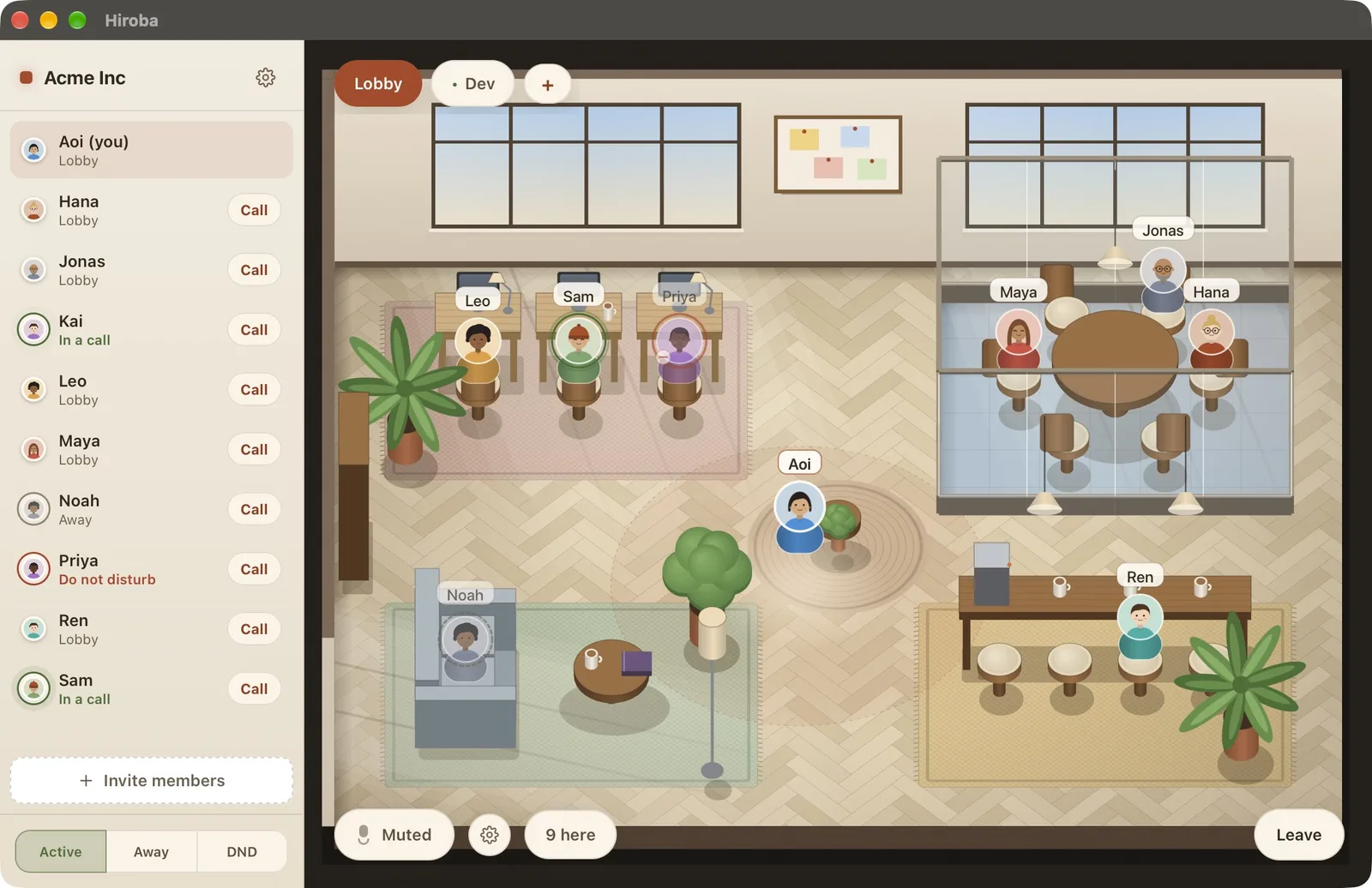
Guests join through a browser invite link with just a name—no app or account required. You can try the same guest experience using the card below, which opens our public demo office.
The hosted edition costs $2 per registered member per month, billed monthly with no seat minimum. A 30-day trial starts automatically when you sign in, with no credit card required. The source code is available on GitHub under the Apache 2.0 license. The self-hosted version has no seat limits or features locked behind a paid plan.
Best for: teams of roughly 3 to 50 people that want a lightweight virtual office without an annual commitment or a 10-seat minimum.
Watch out: if you need meeting recordings, you'll still need a tool such as Zoom or Google Meet.
Which alternative fits your team?
We're fewer than 10 people and paying for empty seats
Hiroba: 4 people pay $8 a month instead of $134.90. SoWork Basic is $24 for 4 if you want in-world meetings. SoWork Free (10 members) and Kumospace Free (5 members) cost nothing if their limits fit.
We keep hitting the 500-minute cap
Any of the five alternatives will remove that limit on a paid plan. Choose based on the office layout, meeting features, and pricing that suit your team.
We liked Sococo's office map and Knock feature
Try Kumospace or Gather for a visual office with rooms and built-in meetings. Hiroba offers a lightweight app with a lobby, team rooms, spatial voice, and a Call button for reaching colleagues in other rooms.
People kept closing Sococo because the Chrome tab slowed their laptops
Try Hiroba on the laptops that struggled with Sococo. Its desktop app is designed for low background resource usage, so your team can leave it open while working in other applications.
We're a large organization with procurement requirements
Kumospace Enterprise, SoWork Enterprise, or Gather Custom for SSO, SLAs, and invoicing. Hiroba offers an Enterprise arrangement for invoicing on request.
Why we'd suggest trying Hiroba first
If your main goal is to see who's around and start a quick conversation, Hiroba is worth trying first. We designed it around a simple problem: when a virtual office slows people down, they close it. Once enough people leave, there's little reason for anyone else to stay. Low background resource usage helps keep the office available for spontaneous conversations, screen sharing, and video calls.
It's also inexpensive to try beyond the trial. At $2 per seat, billed monthly with no minimum, a 10-person team pays $20 a month, and a four-person team pays $8. Both would pay at least $134.90 a month for Sococo, prepaid annually. If you prefer to self-host, you can run the Apache-2.0-licensed server on a small virtual machine without per-seat fees. The open-source license also means you can keep running it independently of our hosted service.
Explore the demo office, then download Hiroba to try it with your team. Your 30-day trial starts automatically when you sign in, requires no credit card, and ends without a subscription to cancel. Leave the app open alongside your usual tools for a full working day and see how it fits.
Download Hiroba→Frequently asked questions
How much does Sococo cost?
The standard plan is $13.49 per seat per month, prepaid annually, with a 10-seat minimum and 500 pooled minutes per seat per month of Sococo's own audio, video, and screen sharing; extra minutes are $5 per 1,000. Sococo Unlimited is $24.99 per seat on an annual term with a 100-seat minimum and no minute cap. There is no free plan; the 14-day trial includes 500 minutes.
Is Sococo still available?
Yes. The global service was still operating and selling the two plans above when we checked on October 10, 2026. Some regional resellers have stopped carrying it; the Japanese distributor ended reseller sales in March 2025, for example. If you bought through a reseller, check who your support and billing contact is now.
What is the cheapest Sococo alternative?
Among the paid plans compared here, Hiroba has the lowest per-seat price at $2 per member per month with no minimum, followed by SoWork Basic at $6 with monthly billing. For a free plan, SoWork supports up to 10 members, Kumospace 5, and Tandem 4. Compare the total bill for your team size, taking seat minimums and pricing tiers into account.
Which alternative has no minute cap?
All five. Gather, Kumospace, SoWork, Tandem, and Hiroba don't meter audio or video on paid plans. SoWork's free plan caps meetings at 30 minutes and Tandem's free plan at 5 call hours a day.
Which Sococo alternative is the lightest?
Hiroba is designed to be lightweight, with published idle CPU usage near 0% and memory usage of roughly 100 MB. Those figures alone don't establish which app uses the fewest resources during everyday work. Try your shortlisted apps on your team's laptops, both while idle and during calls.
Is there an open-source alternative to Sococo?
Hiroba is available under the Apache 2.0 license, with a single-binary server you can self-host without seat limits. WorkAdventure is a browser-based alternative licensed under the AGPL. It supports custom maps and requires LiveKit and Coturn for self-hosting. See our open-source virtual office comparison for more options.